Introduction
vite-plugin-monitor is a Vite plugin that adds automatic user interaction tracking, server-side event logging, and a built-in real-time dashboard to any Vite application — with a single entry in vite.config.ts and zero application code changes required.
What does it do?
The plugin intercepts browser interactions at the lowest level (before any application code runs) and forwards them to a configurable backend. It provides everything you need to understand what users are doing in your application during development and production.
How it works
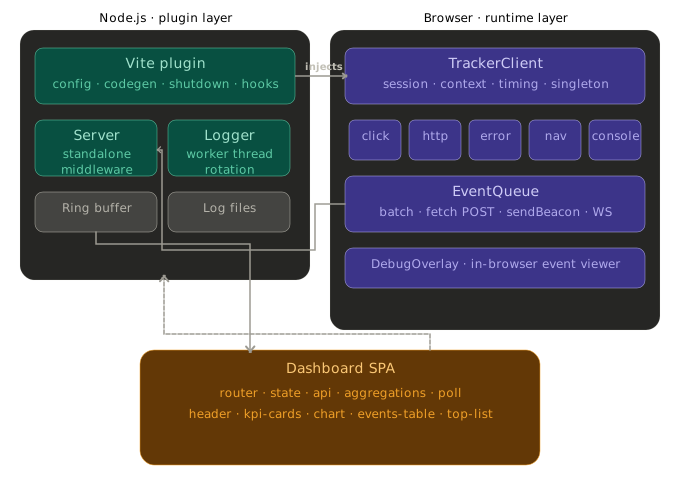
When Vite processes your index.html, the plugin injects two scripts at head-prepend — before any other code runs:
Setup script — Installs all event proxies (
fetch,XHR,console,history, etc.) immediately. Events are enqueued but not yet flushed. This runs before your application code to ensure no events are missed.Auto-init script — Calls
tracker.init(), activates the flush timer, mounts the overlay, and emits the initialsession:startevent. This can be disabled withautoInit: falsefor manual initialization.
On the server side, the plugin can operate in four different modes:
| Mode | Description |
|---|---|
middleware | Events handled directly by Vite's dev server. Default in dev. |
http | Events sent to your own API endpoint. Required in production. |
websocket | All traffic flows over a single persistent WebSocket connection. |
Key Concepts
TrackerEvent
Every interaction captured by the plugin is represented as a TrackerEvent — a single envelope that flows through the entire system: from the browser to the queue, to the backend, to the log file, and finally to the dashboard.
interface TrackerEvent {
  id:         string           // Set to "" by the browser client; assigned by the backend on ingest
  timestamp:  string           // ISO 8601 UTC (when captured, not flushed)
  level:      LogLevel         // 'debug' | 'info' | 'warn' | 'error'
  type:       TrackerEventType // Discriminant for the payload union
  appId:      string           // From trackerPlugin({ appId })
  sessionId:  string           // Per-tab lifetime identifier
  userId:     string           // Identified or anonymous user ID
  groupId?:   string           // Optional — links related events
  context?:   Record<string, unknown> // Persistent metadata
  payload:    EventPayload     // Type-specific data
  meta:       EventMeta        // Browser metadata (UA, viewport, etc.)
}Session
A session is scoped to a single browser tab lifetime. The session ID (sess_ prefix + random identifier) is stored in sessionStorage and survives soft navigations but not tab closes or hard reloads.
Event Queue
The client-side EventQueue batches events and flushes them:
- When
batchSizeevents have accumulated (default: 25) - After
flushIntervalms (default: 7000 ms) - On page unload via
navigator.sendBeacon(guaranteed delivery) - Automatically retries on network failure
Architecture Overview
Browser                          Vite Plugin (Node.js)
─────────────────────────────    ──────────────────────────────
Setup Script (head-prepend)  →   configResolved()  → resolveOptions()
  ├─ Install fetch proxy          transformIndexHtml() → inject scripts
  ├─ Install XHR proxy            configureServer()  → mount middleware
  ├─ Install console proxy        buildStart()       → create log dirs
  └─ Install history proxy        closeBundle()      → copy dashboard

TrackerClient.init()
  ├─ Start flush timer         →  POST /_tracker/events
  ├─ Mount overlay                 ├─ RingBuffer.push()
  └─ Emit session:start            └─ Logger (main thread, fs.WriteStream)
                                       ├─ JSONL transport
                                       └─ Pretty transport

Dashboard SPA (/_dashboard)  →   GET /_tracker?since=...&until=...
  ├─ KPI cards                     └─ RingBuffer.query()
  ├─ Charts
└─ Events tableWhy use this?
- Development: Understand what your users (or testers) do in your app without adding analytics SDKs or writing custom logging.
- Staging: Catch unhandled errors and unexpected navigation patterns before production.
- Production: Send events to your own backend while keeping a built-in dashboard for ops visibility.